


Clip-On USB Aquarium Light for Nano Tanks & Desktops
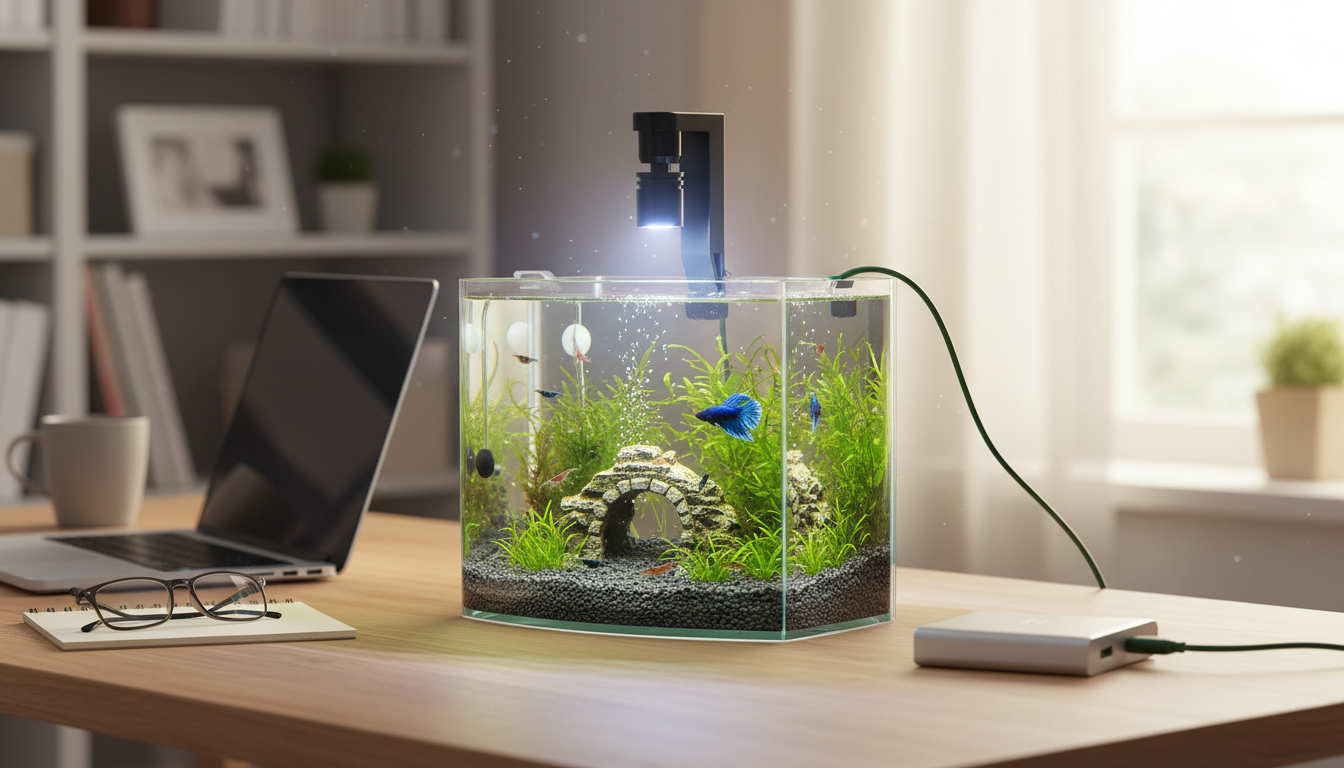
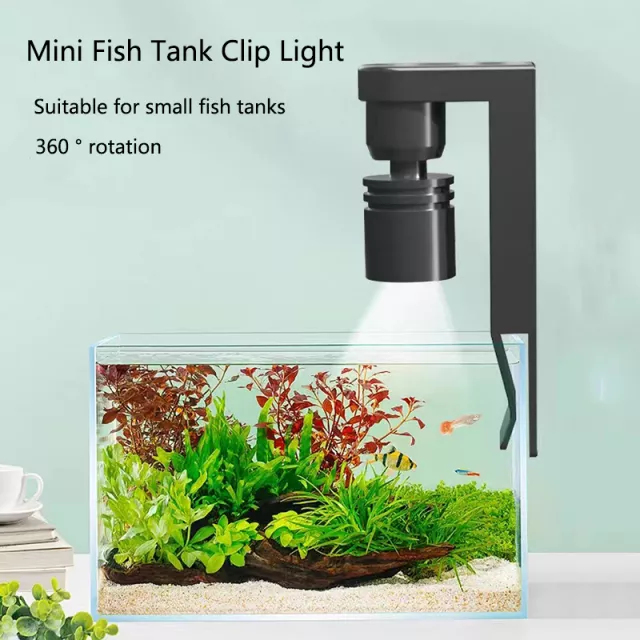
Mini Clip-On USB Aquarium Light for Small Tanks and Desktop Setups
A mini clip-on aquarium light powered by USB is a simple upgrade for small freshwater tanks, shrimp bowls, quarantine containers, and desktop aquariums. Instead of dealing with bulky hoods or hard-to-fit fixtures, a compact clamp mount lets you position the beam right where you want it—then plug into a common USB power source to keep a consistent day/night routine and improve visibility.
What a clip-on USB aquarium light is best for
Small setups benefit the most from a compact, clamp-style LED because it solves the two biggest pain points of nano tanks: limited space and limited mounting options. A mini USB light is especially practical for:
- Small aquariums and nano tanks where a full-length hood light is unnecessary
- Temporary or secondary setups such as quarantine tanks, fry tanks, and hospital containers
- Desk and countertop aquariums powered from a USB adapter, power bank, or computer USB port
- Supplemental lighting for dim rooms to improve viewing and help maintain a stable photoperiod
- Simple clamp mounting on thin glass or acrylic rims (confirm clamp clearance and rim thickness before buying)
Mini Clip-On USB Aquarium Light: highlights and practical benefits
A USB clip-on aquarium light focuses on convenience: minimal hardware, easy placement, and flexible powering. For small tanks, that usually matters more than complex programming features.
- USB-powered convenience: runs on common 5V USB sources (wall adapter, power strip USB, powered hub, or power bank)
- Clip-on mount: positions the light over the tank without needing a canopy or custom lid
- Space-saving footprint: fits compact tanks and minimalist desktop setups
- Low heat output: typical of small LED fixtures, helping reduce unwanted temperature swings near the water surface
- Quick setup: clamp, aim, and power on—handy for beginners and as a backup light
Quick checklist before placing a clip-on light over a tank
| Item to check | Why it matters | What to do |
|---|---|---|
| Tank rim and thickness | Ensures the clamp can grip securely without slipping | Measure rim thickness and confirm there is a flat edge for the clamp |
| Splash and condensation exposure | Moisture can shorten electronics lifespan | Position above splash zone; wipe condensation; avoid direct spray from filters/air stones |
| Power source location | Prevents cable strain and accidental unplugging | Route the USB cable with slack and use a drip loop |
| Livestock sensitivity | Some fish and shrimp stress under sudden bright light | Use a consistent schedule; avoid abrupt night-time switching |
| Plants (if any) | Plant needs vary widely by species and tank depth | Start with a moderate photoperiod; adjust if algae increases or plants stall |
Featured picks (in stock)
For a straightforward, space-saving lighting upgrade, start with the dedicated tank light and add simple accessories that support a tidy desktop setup.
- Mini Clip-On USB Aquarium Light — a compact clamp-on LED designed for small tanks and quick placement.
- 13-Color RGB LED Night Light for Kids — a small ambient room light option for gentle evening viewing around your desk setup (kept outside the tank area).
USB power options and safe setup
USB-powered aquarium lights are flexible, but water and electronics demand careful cable management. A few small habits help prevent flicker, accidental unplugging, and moisture issues.
- Use a quality USB wall adapter or powered USB hub; avoid loose ports that cut power intermittently.
- Add a drip loop in the cable so any water running down the cord drips away from the power source.
- Keep connectors dry and elevated; do not rest USB plugs on wet surfaces.
- If using a power bank, choose one with stable output and auto-on behavior that doesn’t shut off at low current draw.
- Mount the light so the beam spreads across the tank rather than spotlighting a single area.
LEDs are widely used because they deliver useful light with relatively low energy use and low heat compared with older lighting types. For a quick overview of LED efficiency basics, see ENERGY STAR’s LED lighting guidance and the U.S. Department of Energy overview on LED lighting.
Light schedule guidance for fish, shrimp, and easy plants
Small tanks can swing faster than large tanks—temperature, algae, and animal stress all react quickly. A predictable schedule helps keep the environment steady, and it’s often the simplest “algae control tool” available.
Starting photoperiod suggestions (adjust based on results)
| Setup type | Suggested daily light time | Adjustment tip |
|---|---|---|
| No plants (viewing only) | 4–6 hours | Increase slowly if the tank looks too dim; avoid late-night lighting |
| Easy low-light plants (anubias, java fern, moss) | 6–8 hours | If algae increases, drop by 1 hour for a week and reassess |
| New tank under 30 days | 4–6 hours | Extend after the tank stabilizes and algae is under control |
Placement and aiming for better coverage
Care, troubleshooting, and longevity
FAQ
Can a USB-powered aquarium light run from a power bank?
Yes, as long as the power bank provides stable 5V output and doesn’t auto-shutoff at low current draw. Keep the bank away from splashes and route the cable with a drip loop.
How many hours should an aquarium light be on each day?
A common starting range is 6–8 hours for easy planted tanks and 4–6 hours for viewing-only or new setups. Adjust gradually based on algae and plant response so you can tell what change helped.
Is a clip-on light safe for open-top tanks?
Generally yes when it’s clamped securely and kept out of direct splash zones. Keep connectors dry, maintain a drip loop, and wipe away condensation if it builds up.











Leave a comment