


Cat-Themed Ergonomic Gaming Chair: Cute, Comfy Support
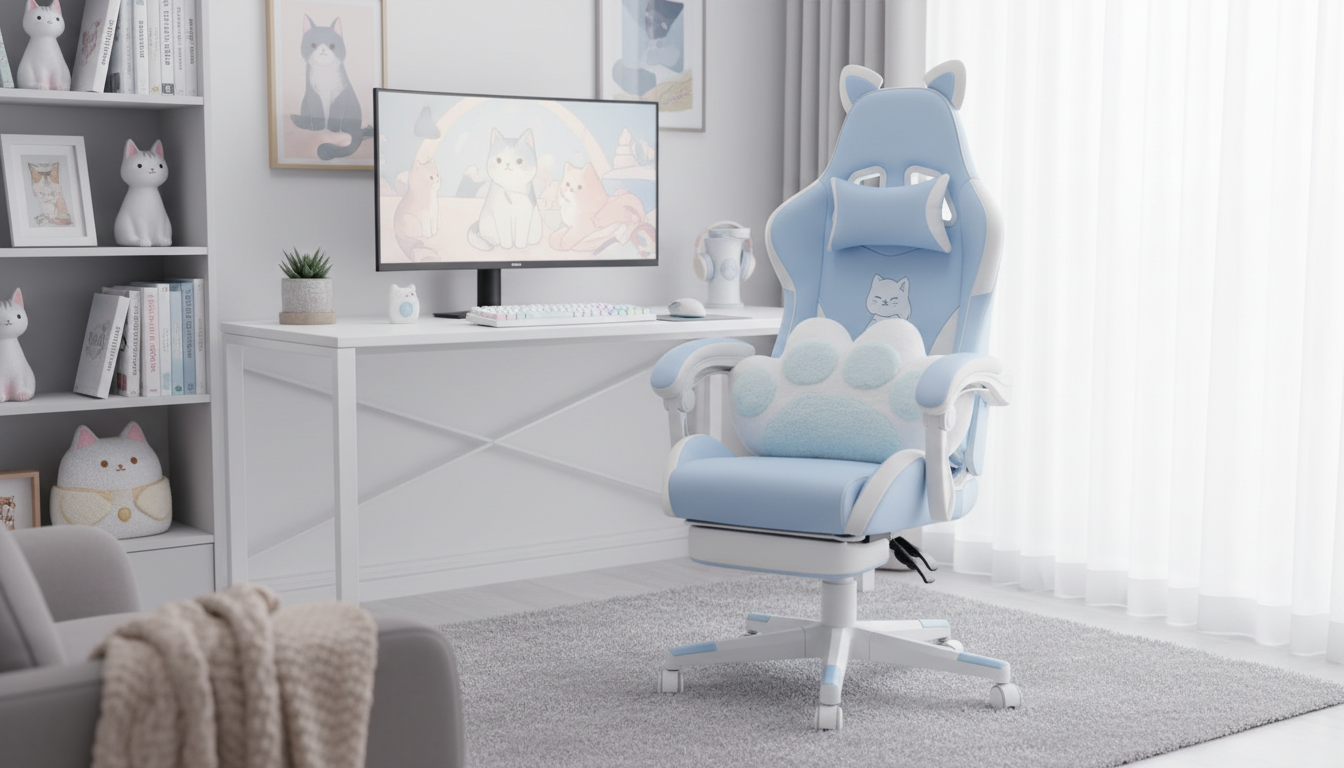
Cute Cat-Themed Ergonomic Gaming Chair: Comfort, Support, and Playful Style
A cat-themed gaming chair can be more than a cute setup piece—good ergonomics, adjustability, and materials are what keep long gaming, streaming, or study sessions comfortable. With the right fit, a playful chair can still support a neutral posture, reduce fatigue, and make your desk area feel more “you.” Below is a practical guide to the features that matter, how to set your chair up, and how to keep your cat-themed space stylish without getting cluttered.
What Makes a Cat-Themed Gaming Chair Feel Ergonomic
The theme is the fun part; the structure is what determines whether you’ll still feel good after hours at your desk.
- Supportive backrest shape: Look for a contour that encourages an upright, neutral spine instead of a rounded, slouched posture.
- Adjustable seat height: The goal is feet flat on the floor and knees near a right angle so your legs aren’t dangling or overly tucked.
- Armrest positioning: Proper arm support reduces shoulder tension during mouse/keyboard use or controller play.
- Balanced cushioning: Too soft can let the pelvis sink and tilt; too firm can create pressure points. The sweet spot feels stable but comfortable.
- Stable base and smooth-rolling casters: A steady base improves safety while casters make it easy to reposition without twisting your back.
If you want a deeper ergonomics baseline for desk posture and alignment, these references are solid starting points: OSHA’s Computer Workstations eTool and Mayo Clinic’s office ergonomics guide.
Who This Chair Style Fits Best
- Gamers and streamers: Ideal for anyone who wants a playful aesthetic without sacrificing everyday support.
- Students and remote workers: Helpful for long blocks of sitting where consistent back support matters.
- Bedroom and small-office setups: A themed chair can double as decor when you don’t have space for extra display pieces.
- Gift buyers: It’s a functional gift that still feels personal, especially for cat lovers and cozy-room enthusiasts.
Quick Comfort Setup: Dialing In the Fit
Even an excellent chair can feel “off” if it’s not adjusted to your body and desk. A quick setup routine makes a big difference.
- Set seat height first: Raise or lower until your feet rest fully on the floor. If the desk height forces the chair higher, add a footrest so your legs stay supported.
- Adjust armrests: Aim for elbows resting lightly near your sides and shoulders staying relaxed (not lifted).
- Use the backrest support: Position yourself so your lower back feels supported. Avoid leaning far forward for long periods—pull the chair closer instead.
- Place your monitor correctly: Keep it about eye level and roughly an arm’s length away to reduce neck strain.
- Take movement breaks: Stand, stretch hips/hamstrings, and reset posture every 30–60 minutes. Consistency beats a single long stretch session.
Features to Compare Before Buying
Cat ears and stitching can catch your eye, but these practical specs determine long-term comfort.
At-a-Glance Feature Checklist
| Feature | Why it matters | Quick test at home |
|---|---|---|
| Seat height range | Helps keep feet supported and hips level | Feet flat, knees comfortable, no pressure behind knees |
| Back support shape | Reduces fatigue during long sessions | Lower back feels supported without forcing an arch |
| Armrest positioning | Limits shoulder/neck tension | Elbows lightly supported; shoulders relaxed |
| Cushion firmness | Prevents sinking and uneven pelvic tilt | Comfortable after 20–30 minutes without “bottoming out” |
| Base/casters | Stability and easy movement | No wobble; rolls smoothly on your floor type |
Styling a Cat-Themed Setup Without Clutter
- Repeat one accent color: Match a color from the chair (ears, trim, or stitching) with a desk mat or curtain for a cohesive look.
- Use warm, indirect lighting: It highlights the theme while reducing screen glare. A gentle ambient option like the 13-Color RGB LED Night Light for Kids can add mood without overpowering your workspace.
- Keep the desktop minimal: Prioritize the essentials—keyboard, mouse, and one catch-all tray for small items.
- Add practical comfort upgrades: A footrest, wrist rest, or floor mat protects surfaces and improves long-session comfort.
- Use subtle cable management: White or black channels blend in and keep the “cute” from turning into “chaotic.”
Care Tips for Keeping the Chair Looking New
A Cute Option to Consider
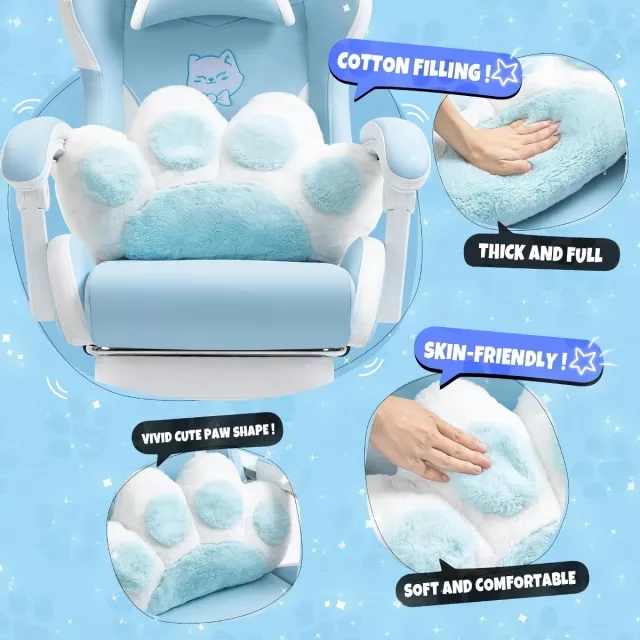
If you want a chair that balances playful character with everyday sitting comfort, the Cute Cat-Themed Ergonomic Gaming Chair is designed to stand out in gaming corners, study desks, and streaming backdrops. For a more complete comfort routine after long screen time, pairing your setup with a simple recovery tool like the Portable Eye Massager can make breaks feel more restorative.
For best results, pair your chair with a desk-height arrangement that supports neutral posture: feet supported, shoulders relaxed, and the monitor positioned to minimize neck tilt. For additional context on reducing strain and preventing overuse issues, the NIOSH ergonomics overview is a helpful reference.
FAQ
Is a themed gaming chair comfortable for long sessions?
It can be, as long as the chair has real ergonomic support and adjustability. Prioritize seat height, back support, and armrest positioning, and add a footrest if your desk height forces the chair too high.
How do you choose the right chair height for gaming and desk work?
Adjust the chair so your feet are flat and your knees are close to a 90-degree angle, then set arm support so you don’t lift your shoulders. After that, fine-tune keyboard/mouse placement and bring the monitor to eye level.
What’s the best way to protect floors from gaming chair casters?
Use a chair mat that covers your full rolling area and matches your floor type (hardwood or carpet). It reduces wear and usually makes rolling smoother and quieter.











Leave a comment